Read faster.
Stay focused.
One word at a time, right where your eyes already are. Share an article, a thread or a PDF and read it in a calm, private reader. Many readers go 2-3x faster on lighter texts.
Your eyes stay still. The words come to you.


One word at a time.
Each word lands in the same spot with its focus letter in red, so your eyes stop jumping. Pause and the whole sentence is there.
Guided.
The whole text on one page, with a highlight that moves word by word. Turn on the voice and it reads along.
Listen.
Your phone reads it aloud with its own voice, or with an optional natural voice (male or female, many languages) that runs on the phone. It keeps going with the screen locked.
Add anything.
Share from any app, paste a link or text, or open a PDF, EPUB or DOCX. The clean text lands in your library.

Your eyes stop jumping.
On a page, your eyes leap along the line and slide back. Here each word comes to the same spot, a full stop gets a pause, and when you stop, the whole sentence waits.
Everything you meant to read.
Share from Safari, Chrome, X, Reddit or any app with a share sheet. SpeedRead pulls out the clean text on your phone and keeps it in your library, ready when you are.
- Web articles
- Paste a link or share it from any browser.
- X
- Posts, whole threads and X Articles.
- Posts, shared straight from the app.
- Files
- PDF, EPUB, DOCX, TXT and Markdown.
- Text
- Paste anything you copied.

Faster, and it still sinks in.
Speed only helps if you remember what you read. These are the parts that make it stick.
A pause where the sentence needs one.
Smart slowing gives every full stop a pause and every comma a breath. Long words, numbers and acronyms get a little more time. You set the pace; the rhythm follows the sentence.
- Full stop: about a quarter of a second more
- Knows the punctuation of Arabic, Chinese and Japanese too
Each bar is one word. Longer bar, longer on screen, at 300 wpm.
Bold the first half. Let the eye finish the word.
Bionic reading sets the first half of each word in bold, together with the red focus letter. Some readers find word shapes land sooner. It works with Latin, Cyrillic and Hebrew text, and it is one switch in Reading settings.
The gist before you commit.
See a short summary, key points and topic tags before you start. They are made on your phone by Apple Intelligence or Gemini Nano when your phone has it, or by an optional free model you can download. Your text never goes to a cloud AI.

Keep what matters. Check what stuck.
Pause on a sentence to highlight it or add a note, then export your highlights as Markdown. When you finish, a short quiz built from the text on your phone shows what you took in.


A small habit you can see.
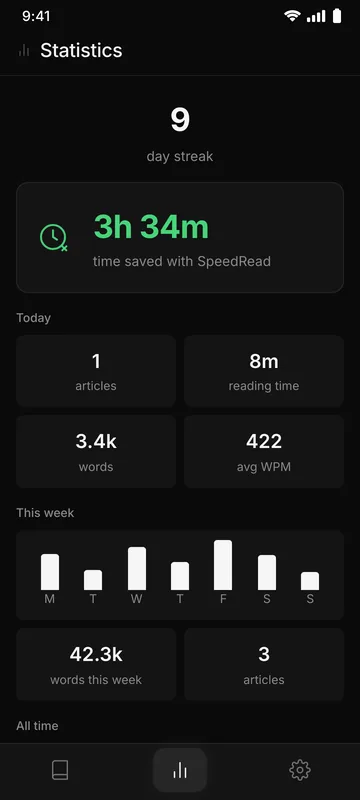
Your streak, words read, average pace and the time you saved, counted on your phone. Ten minutes a day is about three thousand words at a comfortable pace.

Every language, one word at a time.
Read in 26 languages, from English and Spanish to Japanese, Chinese, Thai, Arabic and Hebrew, with the right glyphs and pauses that know each script’s punctuation. The app itself speaks 9.
- FontsDefault, Serif, Times New Roman, Legible, Mono or your system font
- ThemeDark, light or follow the system
- AccessVoiceOver labels, Dynamic Type and reduced motion







No account. No ads. No tracking.
Your library stays on your phone
Articles, highlights, stats and settings live on your device. Export, import or delete everything in Settings.
Nothing in between
Links are downloaded straight from the website to your phone. There is no SpeedRead server, so we never see what you read.
AI that stays on the device
Summaries, key points and quizzes are made on your phone. Your text is never uploaded to a cloud AI.
No analytics
No analytics, no advertising identifiers, no telemetry. Free, with nothing to sell.
Read on the train. Listen on the walk home.
Start in the one-word reader, switch to Guided when you want the whole page, or let SpeedRead read it aloud and keep going with the screen locked. Your place is saved either way.